エスケープシーケンスを使うことで、ターミナルに出力される文字の色を変更できるようなので調べてみました。
エスケープシーケンス
以下が代表的な文字列ですが、Javaの場合Hexadecimalには対応していないようです。
- Ctrl-Key:
^[ - Octal:
\033 - Unicode:
\u001b - Hexadecimal:
\x1B
Octalだけ使用確認ができたのでOctalを使ってみます。
    public static String str = "testString";

    public static String yellow = "\033[43m";

    public static String green = "\033[42m";

    public static String df = "\033[0m";

    public static String backgrondGreen = "\033[0;32m";
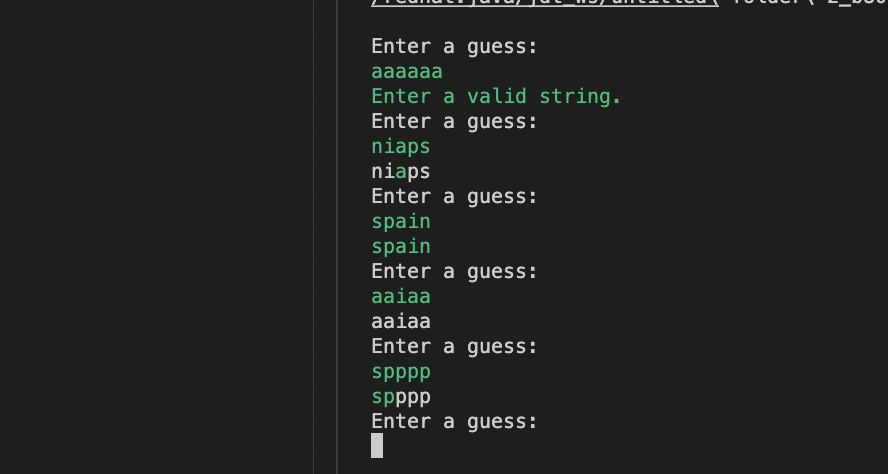
これを使って、ターミナルで実行できるwordleのようなものを作成してみました。
import java.util.Scanner;
public class Test{

    public static String str = "testString";

    public static String yellow = "\033[43m";

    public static String green = "\033[42m";

    public static String df = "\033[0m";

    public static String backgrondGreen = "\033[0;32m";

    public static void main(String[] args) {

        System.out.println(df);

        Scanner s = new Scanner(System.in);

        String userInput = "";

        String result = "";

        String target = "spain";

        while(true){

            System.out.println(df + "Enter a guess:"+ backgrondGreen);

            userInput = s.nextLine();

            if (userInput.length() == 5){
                for (int i = 0;i<5;i++){
                    if (target.charAt(i) == userInput.charAt(i)){
                        result += backgrondGreen + userInput.charAt(i) + df;
                    }else{
                        result += df + userInput.charAt(i);
                    }
                }
                System.out.println(result);
                result = "";
            }else{
                System.out.println("Enter a valid string.");
            }
        }
    }
}
実行結果