

機械学習のデータの前処理で、pandasを使う派とデータベースを使う派がいますが、pandasの方は使いにくくてよくわからないので練習します。ついでに得意なSQLの方も使って同じようにデータを加工してみます。
目次
使用するデータセット
以下のサイトからダウンロードした、heart disease に関するデータセットを使用します。
https://www.kaggle.com/datasets/johnsmith88/heart-disease-dataset?resource=download
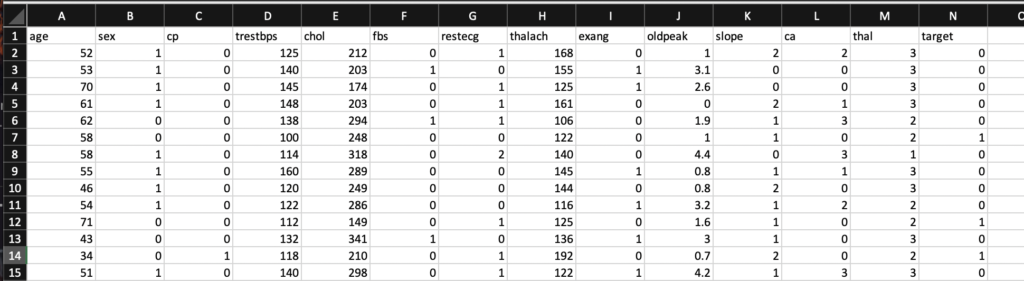
CSVファイルの中身はこんな感じになっています。
Pandasの場合
read_csvメソッドを使用することで、データの読み込みを一行でおこなってくれるようです。
import pandas as pd
data = pd.read_csv('heart.csv')

X = data.drop('target',axis = 1)
y = data['target']

>>>
      age  sex  cp  trestbps  chol  fbs  restecg  thalach  exang  oldpeak  slope  ca  thal
0      52    1   0       125   212    0        1      168      0      1.0      2   2     3
1      53    1   0       140   203    1        0      155      1      3.1      0   0     3
2      70    1   0       145   174    0        1      125      1      2.6      0   0     3
3      61    1   0       148   203    0        1      161      0      0.0      2   1     3
4      62    0   0       138   294    1        1      106      0      1.9      1   3     2
...   ...  ...  ..       ...   ...  ...      ...      ...    ...      ...    ...  ..   ...
1020   59    1   1       140   221    0        1      164      1      0.0      2   0     2
1021   60    1   0       125   258    0        0      141      1      2.8      1   1     3
1022   47    1   0       110   275    0        0      118      1      1.0      1   1     2
1023   50    0   0       110   254    0        0      159      0      0.0      2   0     2
1024   54    1   0       120   188    0        1      113      0      1.4      1   1     3

[1025 rows x 13 columns]
0       0
1       0
2       0
3       0
4       0
       ..
1020    1
1021    0
1022    0
1023    1
1024    0
Name: target, Length: 1025, dtype: int64
上記の説明変数と従属変数を使用して、sklearnのランダムフォレストを使ってみます。
from sklearn.ensemble import RandomForestClassifier
model = RandomForestClassifier()
from sklearn.model_selection import train_test_split

X_train, X_test, y_train, y_test = train_test_split(X,y,test_size=0.5)
print(X_train)

model.fit(X_train,y_train)

#prediction
y_preds = model.predict(X_test)

print(y_preds)

#get max percent
print(model.score(X_train,y_train))

print(model.score(X_test,y_test))

>>>
     age  sex  cp  trestbps  chol  fbs  restecg  thalach  exang  oldpeak  slope  ca  thal
303   60    1   0       145   282    0        0      142      1      2.8      1   2     3
383   58    1   0       150   270    0        0      111      1      0.8      2   0     3
708   60    0   2       120   178    1        1       96      0      0.0      2   0     2
213   43    1   2       130   315    0        1      162      0      1.9      2   1     2
614   51    0   0       130   305    0        1      142      1      1.2      1   0     3
..   ...  ...  ..       ...   ...  ...      ...      ...    ...      ...    ...  ..   ...
507   41    0   1       130   204    0        0      172      0      1.4      2   0     2
347   54    0   2       108   267    0        0      167      0      0.0      2   0     2
341   44    1   2       120   226    0        1      169      0      0.0      2   0     2
53    49    1   2       120   188    0        1      139      0      2.0      1   3     3
775   51    1   2       100   222    0        1      143      1      1.2      1   0     2

[512 rows x 13 columns]
[0 1 1 0 0 0 0 1 1 1 1 0 0 0 0 1 1 0 0 1 0 0 1 1 0 0 0 0 0 1 0 0 0 1 0 1 1
 0 0 0 0 1 1 0 0 0 0 1 0 1 1 1 0 1 0 0 1 0 1 0 1 0 1 0 1 0 1 1 1 0 1 0 0 1
 0 1 0 0 1 0 0 0 1 1 0 0 0 0 1 0 0 0 1 0 1 1 0 0 1 0 1 1 1 1 0 0 1 0 0 1 0
 1 1 1 0 1 0 1 1 1 1 1 0 1 0 0 0 1 1 1 1 0 1 0 0 1 0 1 1 0 1 1 1 0 0 1 1 1
 1 1 0 1 0 1 0 0 1 1 1 0 0 1 0 0 1 1 1 0 1 1 0 1 0 0 0 0 0 0 0 1 1 0 1 0 1
 1 0 0 1 0 1 1 1 0 0 1 1 1 1 1 1 1 1 1 1 0 1 0 0 1 0 1 0 0 1 1 1 0 1 1 0 1
 0 1 0 0 0 0 1 0 1 1 0 0 1 1 1 1 1 0 0 0 1 1 0 0 0 1 0 0 1 1 0 1 0 0 0 1 0
 0 0 1 0 0 0 1 0 0 0 1 1 1 0 1 1 0 1 0 0 1 1 1 1 1 1 0 1 1 1 0 0 0 1 0 1 0
 1 1 1 0 0 0 1 0 1 0 1 0 1 1 0 1 1 0 1 0 1 1 1 1 1 1 0 0 1 1 1 0 1 1 0 1 1
 1 1 1 0 1 1 0 1 0 1 0 1 1 1 1 1 0 1 0 0 0 0 1 0 0 1 0 1 0 0 0 1 1 1 1 0 1
 1 1 1 1 1 1 1 0 0 0 0 0 1 0 1 0 0 1 1 0 1 1 1 0 0 1 1 1 0 1 0 1 0 1 1 1 0
 0 0 1 1 0 0 0 0 1 0 0 0 0 1 0 1 0 0 0 1 0 0 1 1 1 1 1 0 1 1 0 1 0 0 0 0 0
 0 1 1 0 1 0 0 0 0 0 1 0 0 0 1 1 1 0 0 0 0 0 1 1 1 0 0 0 1 0 0 1 1 0 1 1 0
 1 0 0 0 1 1 0 1 1 0 0 1 1 0 0 0 1 1 1 1 1 0 0 1 1 1 0 1 1 1 0 1]
1.0
0.9688109161793372
どうやらsklearnのメソッドはpandasデータフレームを引数として受け取ることが前提のようです。他の受け渡し方もあるかもしれませんが、まだ把握できていません。
いずれにせよ、csvの読み込みから数行でランダムフォレストまで実行できてしまうようです。
MySQLの場合
以下のクラスを作成して、pythonからMySQLに接続して操作します。
from mysql import connector
import user

class Table:
    def __init__(self,table_name:str,columns:list[str]) -> None:

        self.table_name:str = table_name
        self.columns : list[str] = ['id INT PRIMARY KEY AUTO_INCREMENT'] + columns


    def get_columns(self) -> list:
        return [i.split(" ")[0] for i in self.columns][1:]

    def get_table_name(self) -> str:
        return self.table_name

class Database:
    def __init__(self,db_name:str)-> None:
        self.show_exception:bool = True
        self.db_name : str = db_name
        self.host_name : str = 'localhost'
        self.user_name : str = 'root'
        self.user_password : str = f'{user.password}'

        self.mysql_connection = self.create_connection()
        self.create_database()
        self.db_connection = self.create_database_connection()

    def create_connection(self) ->connector.connection.MySQLConnection:
        connection = None
        try:
            connection = connector.connect(
                host=self.host_name,
                user=self.user_name,
                password=self.user_password,
                )
            if connection.is_connected:
                    print("Connection created successfully.")
        except Exception as e:
            if self.show_exception:
                print(f"Exception caught -> {e}")
        return connection

    def create_database(self) -> connector.connection.MySQLConnection:
        c = self.mysql_connection.cursor()
        try:
            c.execute(f'CREATE database {self.db_name}')
            print(f"Database {self.db_name} created successfully.")
        except Exception as e:
            print(f"Caution: Database {self.db_name} already exists.")
            if self.show_exception:
                print(f"Exception caught -> {e}")

    def create_database_connection(self) -> connector.connection.MySQLConnection:
        connection = None
        try:
            connection = connector.connect(
                host=self.host_name,
                user=self.user_name,
                password=self.user_password,
                database = self.db_name
                )
            if connection.is_connected:
                    print(f"Connected to database {self.db_name}...")
        except Exception as e:
               if self.show_exception:
                    print(f"Exception caught -> {e}")
        return connection

    def execute(self,query:str) -> connector:
        c = self.db_connection.cursor()
        try:
            c.execute(query)
            self.db_connection.commit()
            print(f"Query ({query}) excuted successfully.")
        except Exception as e:
               if self.show_exception:
                    print(f"Exception caught -> {e}")
                    print("->Could not execute {}".format(query.replace('\n','')))
        return c

    def drop_database(self,toDrop) -> None:
        if toDrop:
            self.execute(f"DROP DATABASE {self.db_name}")
        else:
            pass
データの格納
from main import Database, Table

db = Database('db')

file_path = 'heart.csv'
with open(file=file_path,mode='r', encoding='utf-8-sig') as fp:
    lines = fp.readlines()

lines = [[i.replace('\n','') for i in j.split(',')] for j in lines]
columns = [f'{i} INT' if i.count('.') == 0 else f'{i} FLOAT' for i in lines[0]]
table1 = Table(table_name='Table1',columns=columns)

db.execute(f'CREATE TABLE {table1.get_table_name()} ({",".join(table1.columns)})')


for i in lines[1:]:
    values = ','.join(i)
    db.execute(f'INSERT INTO {table1.get_table_name()} ({",".join(table1.get_columns())}) VALUES({values})')

db.drop_database(False)
実行結果
MySQL [db]> desc table1;
+----------+------+------+-----+---------+----------------+
| Field    | Type | Null | Key | Default | Extra          |
+----------+------+------+-----+---------+----------------+
| id       | int  | NO   | PRI | NULL    | auto_increment |
| age      | int  | YES  |     | NULL    |                |
| sex      | int  | YES  |     | NULL    |                |
| cp       | int  | YES  |     | NULL    |                |
| trestbps | int  | YES  |     | NULL    |                |
| chol     | int  | YES  |     | NULL    |                |
| fbs      | int  | YES  |     | NULL    |                |
| restecg  | int  | YES  |     | NULL    |                |
| thalach  | int  | YES  |     | NULL    |                |
| exang    | int  | YES  |     | NULL    |                |
| oldpeak  | int  | YES  |     | NULL    |                |
| slope    | int  | YES  |     | NULL    |                |
| ca       | int  | YES  |     | NULL    |                |
| thal     | int  | YES  |     | NULL    |                |
| target   | int  | YES  |     | NULL    |                |
+----------+------+------+-----+---------+----------------+
15 rows in set (0.006 sec)

MySQL [db]> select * from table1;
+------+------+------+------+----------+------+------+---------+---------+-------+---------+-------+------+------+--------+
| id   | age  | sex  | cp   | trestbps | chol | fbs  | restecg | thalach | exang | oldpeak | slope | ca   | thal | target |
+------+------+------+------+----------+------+------+---------+---------+-------+---------+-------+------+------+--------+
|    1 |   52 |    1 |    0 |      125 |  212 |    0 |       1 |     168 |     0 |       1 |     2 |    2 |    3 |      0 |
|    2 |   53 |    1 |    0 |      140 |  203 |    1 |       0 |     155 |     1 |       3 |     0 |    0 |    3 |      0 |
|    3 |   70 |    1 |    0 |      145 |  174 |    0 |       1 |     125 |     1 |       3 |     0 |    0 |    3 |      0 |
|    4 |   61 |    1 |    0 |      148 |  203 |    0 |       1 |     161 |     0 |       0 |     2 |    1 |    3 |      0 |
|    5 |   62 |    0 |    0 |      138 |  294 |    1 |       1 |     106 |     0 |       2 |     1 |    3 |    2 |      0 |
|    6 |   58 |    0 |    0 |      100 |  248 |    0 |       0 |     122 |     0 |       1 |     1 |    0 |    2 |      1 |
|    7 |   58 |    1 |    0 |      114 |  318 |    0 |       2 |     140 |     0 |       4 |     0 |    3 |    1 |      0 |
|    8 |   55 |    1 |    0 |      160 |  289 |    0 |       0 |     145 |     1 |       1 |     1 |    1 |    3 |      0 |
|    9 |   46 |    1 |    0 |      120 |  249 |    0 |       0 |     144 |     0 |       1 |     2 |    0 |    3 |      0 |
|   10 |   54 |    1 |    0 |      122 |  286 |    0 |       0 |     116 |     1 |       3 |     1 |    2 |    2 |      0 |
|   11 |   71 |    0 |    0 |      112 |  149 |    0 |       1 |     125 |     0 |       2 |     1 |    0 |    2 |      1 |
|   12 |   43 |    0 |    0 |      132 |  341 |    1 |       0 |     136 |     1 |       3 |     1 |    0 |    3 |      0 |
|   13 |   34 |    0 |    1 |      118 |  210 |    0 |       1 |     192 |     0 |       1 |     2 |    0 |    2 |      1 |
|   14 |   51 |    1 |    0 |      140 |  298 |    0 |       1 |     122 |     1 |       4 |     1 |    3 |    3 |      0 |
|   15 |   52 |    1 |    0 |      128 |  204 |    1 |       1 |     156 |     1 |       1 |     1 |    0 |    0 |      0 |
|   16 |   34 |    0 |    1 |      118 |  210 |    0 |       1 |     192 |     0 |       1 |     2 |    0 |    2 |      1 |
|   17 |   51 |    0 |    2 |      140 |  308 |    0 |       0 |     142 |     0 |       2 |     2 |    1 |    2 |      1 |
|   18 |   54 |    1 |    0 |      124 |  266 |    0 |       0 |     109 |     1 |       2 |     1 |    1 |    3 |      0 |
|   19 |   50 |    0 |    1 |      120 |  244 |    0 |       1 |     162 |     0 |       1 |     2 |    0 |    2 |      1 |
|   20 |   58 |    1 |    2 |      140 |  211 |    1 |       0 |     165 |     0 |       0 |     2 |    0 |    2 |      1 |
...........................................................................................................................
|  999 |   42 |    1 |    0 |      136 |  315 |    0 |       1 |     125 |     1 |       2 |     1 |    0 |    1 |      0 |
| 1000 |   67 |    1 |    0 |      125 |  254 |    1 |       1 |     163 |     0 |       0 |     1 |    2 |    3 |      0 |
| 1001 |   64 |    1 |    0 |      145 |  212 |    0 |       0 |     132 |     0 |       2 |     1 |    2 |    1 |      0 |
| 1002 |   42 |    1 |    0 |      140 |  226 |    0 |       1 |     178 |     0 |       0 |     2 |    0 |    2 |      1 |
| 1003 |   66 |    1 |    0 |      112 |  212 |    0 |       0 |     132 |     1 |       0 |     2 |    1 |    2 |      0 |
| 1004 |   52 |    1 |    0 |      108 |  233 |    1 |       1 |     147 |     0 |       0 |     2 |    3 |    3 |      1 |
| 1005 |   51 |    0 |    2 |      140 |  308 |    0 |       0 |     142 |     0 |       2 |     2 |    1 |    2 |      1 |
| 1006 |   55 |    0 |    0 |      128 |  205 |    0 |       2 |     130 |     1 |       2 |     1 |    1 |    3 |      0 |
| 1007 |   58 |    1 |    2 |      140 |  211 |    1 |       0 |     165 |     0 |       0 |     2 |    0 |    2 |      1 |
| 1008 |   56 |    1 |    3 |      120 |  193 |    0 |       0 |     162 |     0 |       2 |     1 |    0 |    3 |      1 |
| 1009 |   42 |    1 |    1 |      120 |  295 |    0 |       1 |     162 |     0 |       0 |     2 |    0 |    2 |      1 |
| 1010 |   40 |    1 |    0 |      152 |  223 |    0 |       1 |     181 |     0 |       0 |     2 |    0 |    3 |      0 |
| 1011 |   51 |    1 |    0 |      140 |  299 |    0 |       1 |     173 |     1 |       2 |     2 |    0 |    3 |      0 |
| 1012 |   45 |    1 |    1 |      128 |  308 |    0 |       0 |     170 |     0 |       0 |     2 |    0 |    2 |      1 |
| 1013 |   48 |    1 |    1 |      110 |  229 |    0 |       1 |     168 |     0 |       1 |     0 |    0 |    3 |      0 |
| 1014 |   58 |    1 |    0 |      114 |  318 |    0 |       2 |     140 |     0 |       4 |     0 |    3 |    1 |      0 |
| 1015 |   44 |    0 |    2 |      108 |  141 |    0 |       1 |     175 |     0 |       1 |     1 |    0 |    2 |      1 |
| 1016 |   58 |    1 |    0 |      128 |  216 |    0 |       0 |     131 |     1 |       2 |     1 |    3 |    3 |      0 |
| 1017 |   65 |    1 |    3 |      138 |  282 |    1 |       0 |     174 |     0 |       1 |     1 |    1 |    2 |      0 |
| 1018 |   53 |    1 |    0 |      123 |  282 |    0 |       1 |      95 |     1 |       2 |     1 |    2 |    3 |      0 |
| 1019 |   41 |    1 |    0 |      110 |  172 |    0 |       0 |     158 |     0 |       0 |     2 |    0 |    3 |      0 |
| 1020 |   47 |    1 |    0 |      112 |  204 |    0 |       1 |     143 |     0 |       0 |     2 |    0 |    2 |      1 |
| 1021 |   59 |    1 |    1 |      140 |  221 |    0 |       1 |     164 |     1 |       0 |     2 |    0 |    2 |      1 |
| 1022 |   60 |    1 |    0 |      125 |  258 |    0 |       0 |     141 |     1 |       3 |     1 |    1 |    3 |      0 |
| 1023 |   47 |    1 |    0 |      110 |  275 |    0 |       0 |     118 |     1 |       1 |     1 |    1 |    2 |      0 |
| 1024 |   50 |    0 |    0 |      110 |  254 |    0 |       0 |     159 |     0 |       0 |     2 |    0 |    2 |      1 |
| 1025 |   54 |    1 |    0 |      120 |  188 |    0 |       1 |     113 |     0 |       1 |     1 |    1 |    3 |      0 |
+------+------+------+------+----------+------+------+---------+---------+-------+---------+-------+------+------+--------+
1025 rows in set (0.005 sec)
データ格納のテンプレート
今後のために、上記の操作をテンプレート化しておきます。
from mysql import connector
import user

class Table:
    def __init__(self,table_name:str,columns:list[str]) -> None:

        self.table_name:str = table_name
        self.columns : list[str] = ['id INT PRIMARY KEY AUTO_INCREMENT'] + columns


    def get_columns(self) -> list:
        return [i.split(" ")[0] for i in self.columns][1:]

    def get_table_name(self) -> str:
        return self.table_name

class Database:
    def __init__(self,db_name:str)-> None:
        self.show_exception:bool = True
        self.db_name : str = db_name
        self.host_name : str = 'localhost'
        self.user_name : str = 'root'
        self.user_password : str = f'{user.password}'

        self.mysql_connection = self.create_connection()
        self.create_database()
        self.db_connection = self.create_database_connection()

    def create_connection(self) ->connector.connection.MySQLConnection:
        connection = None
        try:
            connection = connector.connect(
                host=self.host_name,
                user=self.user_name,
                password=self.user_password,
                )
            if connection.is_connected:
                    print("Connection created successfully.")
        except Exception as e:
            if self.show_exception:
                print(f"Exception caught -> {e}")
        return connection

    def create_database(self) -> connector.connection.MySQLConnection:
        c = self.mysql_connection.cursor()
        try:
            c.execute(f'CREATE database {self.db_name}')
            print(f"Database {self.db_name} created successfully.")
        except Exception as e:
            print(f"Caution: Database {self.db_name} already exists.")
            if self.show_exception:
                print(f"Exception caught -> {e}")

    def create_database_connection(self) -> connector.connection.MySQLConnection:
        connection = None
        try:
            connection = connector.connect(
                host=self.host_name,
                user=self.user_name,
                password=self.user_password,
                database = self.db_name
                )
            if connection.is_connected:
                    print(f"Connected to database {self.db_name}...")
        except Exception as e:
               if self.show_exception:
                    print(f"Exception caught -> {e}")
        return connection

    def execute(self,query:str) -> connector:
        c = self.db_connection.cursor()
        try:
            c.execute(query)
            self.db_connection.commit()
            print(f"Query ({query}) excuted successfully.")
        except Exception as e:
               if self.show_exception:
                    print(f"Exception caught -> {e}")
                    print("->Could not execute {}".format(query.replace('\n','')))
        return c

    def drop_database(self,toDrop) -> None:
        if toDrop:
            self.execute(f"DROP DATABASE {self.db_name}")
        else:
            pass


def extract_data(csv_path:str,db_name:str,table_name:str = 'table1',toDrop:bool = False,onHold:bool = False):
    db = Database(db_name)
    file_path = csv_path
    with open(file=file_path,mode='r', encoding='utf-8-sig') as fp:
        lines = fp.readlines()
        lines = [[i.replace('\n','') for i in j.split(',')] for j in lines]
        ##############################################################################
        columns = [f'{i} INT' if i.count('.') == 0 else f'{i} FLOAT' for i in lines[0]]
        ##############################################################################

    table1 = Table(table_name=table_name,columns=columns)

    if not onHold:
        db.execute(f'CREATE TABLE {table1.get_table_name()} ({",".join(table1.columns)})')
        for i in lines[1:]:
            values = ','.join(i)
            db.execute(f'INSERT INTO {table1.get_table_name()} ({",".join(table1.get_columns())}) VALUES({values})')
        db.drop_database(toDrop)
    return db,table1
ランダムフォレストモデルの使用
MySQLから情報を引っ張ってくる練習をするために、上記データに対してsklearnのランダムフォレストモデルを使ってみます。
今のところ、引数としてpandasオブジェクトを渡すということがわかっているので、結局はpandasを使用しますが、MySQLからデータを取ってくる作業の練習をおこなってみます。
"""
db = Database('db')
file_path = 'heart.csv'
with open(file=file_path,mode='r', encoding='utf-8-sig') as fp:
    lines = fp.readlines()

lines = [[i.replace('\n','') for i in j.split(',')] for j in lines]
columns = [f'{i} INT' if i.count('.') == 0 else f'{i} FLOAT' for i in lines[0]]
table1 = Table(table_name='Table1',columns=columns)
"""

import pandas as pd

data = db.execute(f'SELECT * FROM {table1.get_table_name()}').fetchall()
data = [i[1:] for i in data]
df = pd.DataFrame(data)
df = df.rename(columns={i:n for i,n in enumerate(table1.get_columns())})
print(df)

>>>
     age  sex  cp  trestbps  chol  fbs  restecg  thalach  exang  oldpeak  slope  ca  thal  target
0      52    1   0       125   212    0        1      168      0        1      2   2     3       0
1      53    1   0       140   203    1        0      155      1        3      0   0     3       0
2      70    1   0       145   174    0        1      125      1        3      0   0     3       0
3      61    1   0       148   203    0        1      161      0        0      2   1     3       0
4      62    0   0       138   294    1        1      106      0        2      1   3     2       0
...   ...  ...  ..       ...   ...  ...      ...      ...    ...      ...    ...  ..   ...     ...
1020   59    1   1       140   221    0        1      164      1        0      2   0     2       1
1021   60    1   0       125   258    0        0      141      1        3      1   1     3       0
1022   47    1   0       110   275    0        0      118      1        1      1   1     2       0
1023   50    0   0       110   254    0        0      159      0        0      2   0     2       1
1024   54    1   0       120   188    0        1      113      0        1      1   1     3       0

[1025 rows x 14 columns]
Pandasオブジェクトができたのでランダムフォレストにかけます。
from sklearn.ensemble import RandomForestClassifier
from sklearn.model_selection import train_test_split

model = RandomForestClassifier()

X = df.drop('target',axis = 1)
y = df['target']

X_train, X_test, y_train, y_test = train_test_split(X,y,test_size=0.5)
print(X_train)

model.fit(X_train,y_train)

#prediction
y_preds = model.predict(X_test)

print(y_preds)

#get max percent
print(model.score(X_train,y_train))

print(model.score(X_test,y_test))

>>>
      age  sex  cp  trestbps  chol  fbs  restecg  thalach  exang  oldpeak  slope  ca  thal  target
0      52    1   0       125   212    0        1      168      0        1      2   2     3       0
1      53    1   0       140   203    1        0      155      1        3      0   0     3       0
2      70    1   0       145   174    0        1      125      1        3      0   0     3       0
3      61    1   0       148   203    0        1      161      0        0      2   1     3       0
4      62    0   0       138   294    1        1      106      0        2      1   3     2       0
...   ...  ...  ..       ...   ...  ...      ...      ...    ...      ...    ...  ..   ...     ...
1020   59    1   1       140   221    0        1      164      1        0      2   0     2       1
1021   60    1   0       125   258    0        0      141      1        3      1   1     3       0
1022   47    1   0       110   275    0        0      118      1        1      1   1     2       0
1023   50    0   0       110   254    0        0      159      0        0      2   0     2       1
1024   54    1   0       120   188    0        1      113      0        1      1   1     3       0

[1025 rows x 14 columns]
     age  sex  cp  trestbps  chol  fbs  restecg  thalach  exang  oldpeak  slope  ca  thal
458   43    1   0       150   247    0        1      171      0        2      2   0     2
158   67    0   2       115   564    0        0      160      0        2      1   0     3
850   58    1   1       120   284    0        0      160      0        2      1   0     2
489   61    1   2       150   243    1        1      137      1        1      1   0     2
889   63    0   0       150   407    0        0      154      0        4      1   3     3
..   ...  ...  ..       ...   ...  ...      ...      ...    ...      ...    ...  ..   ...
212   50    1   0       150   243    0        0      128      0        3      1   0     3
143   34    1   3       118   182    0        0      174      0        0      2   0     2
146   51    0   2       120   295    0        0      157      0        1      2   0     2
962   52    1   0       108   233    1        1      147      0        0      2   3     3
638   65    1   3       138   282    1        0      174      0        1      1   1     2

[512 rows x 13 columns]
[1 0 1 0 1 1 1 1 1 0 1 0 0 1 1 1 1 1 1 0 1 0 0 1 0 0 0 0 1 1 0 1 0 0 0 1 0
 0 0 1 1 1 0 0 0 1 1 0 0 1 1 0 1 1 0 0 1 0 1 0 0 0 1 0 0 1 0 0 1 0 1 0 0 0
 1 0 0 1 1 0 0 1 1 1 1 0 1 1 1 1 0 1 1 1 0 0 1 0 0 1 0 0 1 0 1 1 0 1 0 0 1
 1 1 0 1 1 1 1 0 0 0 0 0 1 0 1 0 0 1 1 1 1 1 0 0 0 1 1 0 1 1 1 0 1 1 1 1 1
 0 0 0 1 1 1 1 0 0 1 1 0 1 0 0 0 1 0 0 0 0 0 1 1 1 1 1 1 0 1 0 0 0 1 1 0 1
 0 1 1 1 0 1 1 0 0 1 1 0 1 1 1 1 1 1 1 0 1 0 1 0 0 0 0 1 1 1 0 1 0 0 0 0 0
 0 1 1 1 1 1 0 0 1 1 0 0 1 0 1 0 1 1 0 0 0 1 1 0 1 0 1 0 1 1 0 1 0 1 1 0 0
 0 1 1 1 1 1 0 0 0 1 0 1 1 1 1 1 1 0 0 0 1 0 0 0 1 1 1 0 1 1 0 1 0 0 1 0 0
 1 0 1 0 0 1 0 1 1 1 1 1 0 0 1 1 0 0 1 0 1 1 0 1 0 1 0 0 1 0 1 0 0 1 0 1 0
 0 1 1 1 0 1 0 0 0 1 1 0 0 0 1 0 0 1 1 0 1 1 1 0 1 0 1 1 0 0 1 1 1 1 0 0 1
 1 0 1 0 0 0 0 1 1 0 1 0 1 1 0 0 1 0 0 0 1 0 0 1 0 1 1 0 1 0 0 0 0 1 1 0 1
 0 1 0 0 0 1 1 1 0 0 1 1 0 1 0 1 0 0 1 0 0 0 0 1 1 1 1 1 0 0 1 0 0 0 0 0 1
 1 1 1 1 0 0 0 1 1 0 0 1 0 0 0 1 1 1 0 0 0 0 1 1 0 0 0 0 1 0 0 0 0 0 1 0 0
 1 0 1 1 0 0 1 0 1 0 0 1 1 1 0 0 1 1 1 0 1 1 1 1 0 1 1 1 0 0 1 1]
1.0
0.9688109161793372
Pandas単体より冗長にはなりますが、大量のデータを別の場所にきれいに保管しておけると言うのはMySQLの強みだと思います。

