

Pythonを使用して、MySQLのデータベースを操作してみます。
MySQLの基本および、MySQLのセットアップに関しては以下の記事にまとめています。
目次
データベース接続関数の用意
MySQLデータベースに接続します。
from mysql import connector
import user

def create_connection(host_name = 'localhost', user_name = 'root', user_password = None):
    connection = None
    try:
        connection = connector.connect(
            host='localhost',
            user='root',
            password=f'{user.password}',
            )
        if connection.is_connected:
                print("Connected...")
    except Exception as e:
            print(f"Exception caught -> {e}")
    return connection
データベースへの接続に成功した場合は、connectionオブジェクトを返します。
データベースの作成
connectionオブジェクトを使用して、接続先のデータベースに新しいデータベースを作成します。
def create_database(connection, query_create):
    c = connection.cursor()
    try:
        c.execute(query_create)
        print("Database created!")
    except Exception as e:
        print(f"Exception caught -> {e}")
任意のデータベースへの接続
mysqlモジュールのconnectメソッドパラメータに、databaseを指定することで特定のデータベースへ接続することができます。
    def create_database_connection(host_name = 'localhost', user_name = 'root', user_password = None, database = None):
    connection = None
    try:
        connection = connector.connect(
            host='localhost',
            user='root',
            password=f'{user.password}',
            database = database
            )
        if connection.is_connected:
                print("Connected...")
    except Exception as e:
            print(f"Exception caught -> {e}")
    return connection
Query実行関数
SQLを実行してcrud処理を行うメインの関数を作成します。実行後はカーソルオブジェクトを返すようにしておきます。
def execute(connection, query):
    c = connection.cursor()
    try:
        c.execute(query)
        connection.commit()
        print("Query excuted successfully")
    except Exception as e:
        print(f"Exception caught -> {e}")
    return c
実際に上記の関数を使用して、データベースを新規作成後に、2つの要素を保持したテーブルを作成してみます。
#Create database
db_name = "test_database"
connection = create_connection()
create_database(connection,f"create database {db_name}")

#Create table
connection = create_database_connection(database=f"{db_name}")
query = f"use {db_name}"
execute(connection,query)

query = """create table tb1(
            param1 VARCHAR(100),
            param2 INT
            )
        """
execute(connection,query)
実行結果
Database changed
MySQL [test_database]> desc tb1
    -> ;
+--------+--------------+------+-----+---------+-------+
| Field  | Type         | Null | Key | Default | Extra |
+--------+--------------+------+-----+---------+-------+
| param1 | varchar(100) | YES  |     | NULL    |       |
| param2 | int          | YES  |     | NULL    |       |
+--------+--------------+------+-----+---------+-------+
2 rows in set (0.002 sec)

MySQL [test_database]>
基本的にはSQL文によるクエリ実行の繰り返しなので、上記の関数さえあればMySQLの操作を行うことができます。
試しに、アルファベットを全てテーブルに登録するプログラムを書いてみます。
if __name__ == "__main__":
    db_name = "db_sample"

    connection = create_connection()

    create_database(connection=connection,query_create=f"create database {db_name}")

    database_connection = create_database_connection(database=db_name)

    table_name = "table1"

    choose_database = f"use {db_name}"
    execute(database_connection,choose_database)


    database_connection = create_database_connection(database=db_name)

    table_name = "table1"
    choose_database = f"use {db_name}"

    execute(database_connection,"drop table table1")

    execute(database_connection,choose_database)

    create_table_q = f'''create table {table_name}(
                            id INT AUTO_INCREMENT,
                            letters VARCHAR(5),
                            char_num int,
                            primary key (id)
                            )'''

    execute(database_connection,create_table_q)


    insert_cols_q = f'''insert into {table_name}(letters,char_num)
                        values
                        {','.join([f'{l,i+96}' for i,l in enumerate([str(chr(i)) for i in range(97,123)])])}
                    '''

    execute(database_connection,insert_cols_q)
実行結果
MySQL [db_sample]> select * from table1;
+----+---------+----------+
| id | letters | char_num |
+----+---------+----------+
|  1 | a       |       96 |
|  2 | b       |       97 |
|  3 | c       |       98 |
|  4 | d       |       99 |
|  5 | e       |      100 |
|  6 | f       |      101 |
|  7 | g       |      102 |
|  8 | h       |      103 |
|  9 | i       |      104 |
| 10 | j       |      105 |
| 11 | k       |      106 |
| 12 | l       |      107 |
| 13 | m       |      108 |
| 14 | n       |      109 |
| 15 | o       |      110 |
| 16 | p       |      111 |
| 17 | q       |      112 |
| 18 | r       |      113 |
| 19 | s       |      114 |
| 20 | t       |      115 |
| 21 | u       |      116 |
| 22 | v       |      117 |
| 23 | w       |      118 |
| 24 | x       |      119 |
| 25 | y       |      120 |
| 26 | z       |      121 |
+----+---------+----------+
26 rows in set (0.001 sec)

MySQL [db_sample]>
データベースからデータの取得
pythonでselectを行う場合は、カーソルオブジェクトに対して操作を行います。
上記のアルファベットテーブルについて、全てのデータを取得してみます。この時、カラム名も取得できるように、desc文も実行します。
desc_table_q = f'''desc {table_name}'''
desc = execute(database_connection,desc_table_q).fetchall()
columns = [i[0] for i in desc]
select_table_q = f'''select * from {table_name}'''
cur = execute(database_connection,select_table_q)
print(desc)
print(columns)
print(cur.fetchall())
>>>
Exception caught -> 1007 (HY000): Can't create database 'db_sample'; database exists
Connected...
Query excuted successfully
Connected...
Query excuted successfully
Query excuted successfully
Query excuted successfully
Query excuted successfully
Exception caught -> Unread result found
Exception caught -> Unread result found
[('id', 'int', 'NO', 'PRI', None, 'auto_increment'), ('letters', 'varchar(5)', 'YES', '', None, ''), ('char_num', 'int', 'YES', '', None, '')]
['id', 'letters', 'char_num']
[(1, 'a', 96), (2, 'b', 97), (3, 'c', 98), (4, 'd', 99), (5, 'e', 100), (6, 'f', 101), (7, 'g', 102), (8, 'h', 103), (9, 'i', 104), (10, 'j', 105), (11, 'k', 106), (12, 'l', 107), (13, 'm', 108), (14, 'n', 109), (15, 'o', 110), (16, 'p', 111), (17, 'q', 112), (18, 'r', 113), (19, 's', 114), (20, 't', 115), (21, 'u', 116), (22, 'v', 117), (23, 'w', 118), (24, 'x', 119), (25, 'y', 120), (26, 'z', 121)]
crud操作の実装
データベース操作を簡単に行えるように、データベースの作成から追加までの一連の流れをテンプレート化します。
from mysql import connector
import user

class Table:
    def __init__(self,table_name:str,columns:list[str]) -> None:

        self.table_name:str = table_name
        self.columns : list[str] = ['id INT PRIMARY KEY AUTO_INCREMENT'] + columns


    def get_columns(self) -> list:
        return [i.split(" ")[0] for i in self.columns][1:]

    def get_table_name(self) -> str:
        return self.table_name

class Database:
    def __init__(self,db_name:str)-> None:
        self.show_exception:bool = True
        self.db_name : str = db_name
        self.host_name : str = 'localhost'
        self.user_name : str = 'root'
        self.user_password : str = f'{user.password}'

        self.mysql_connection = self.create_connection()
        self.create_database()
        self.db_connection = self.create_database_connection()

    def create_connection(self) ->connector.connection.MySQLConnection:
        connection = None
        try:
            connection = connector.connect(
                host=self.host_name,
                user=self.user_name,
                password=self.user_password,
                )
            if connection.is_connected:
                    print("Connection created successfully.")
        except Exception as e:
            if self.show_exception:
                print(f"Exception caught -> {e}")
        return connection

    def create_database(self) -> connector.connection.MySQLConnection:
        c = self.mysql_connection.cursor()
        try:
            c.execute(f'CREATE database {self.db_name}')
            print(f"Database {self.db_name} created successfully.")
        except Exception as e:
            print(f"Caution: Database {self.db_name} already exists.")
            if self.show_exception:
                print(f"Exception caught -> {e}")

    def create_database_connection(self) -> connector.connection.MySQLConnection:
        connection = None
        try:
            connection = connector.connect(
                host=self.host_name,
                user=self.user_name,
                password=self.user_password,
                database = self.db_name
                )
            if connection.is_connected:
                    print(f"Connected to database {self.db_name}...")
        except Exception as e:
               if self.show_exception:
                    print(f"Exception caught -> {e}")
        return connection

    def execute(self,query:str) -> connector:
        c = self.db_connection.cursor()
        try:
            c.execute(query)
            self.db_connection.commit()
            print(f"Query ({query}) excuted successfully.")
        except Exception as e:
               if self.show_exception:
                    print(f"Exception caught -> {e}")
                    print("->Could not execute {}".format(query.replace('\n','')))
        return c

    def drop_database(self,toDrop) -> None:
        if toDrop:
            self.execute(f"DROP DATABASE {self.db_name}")
        else:
            pass
上記のクラスを使用してみます。
MySQL [db]> show tables
    -> ;
+--------------+
| Tables_in_db |
+--------------+
| table1       |
+--------------+
1 row in set (0.002 sec)

MySQL [db]> desc table1
    -> ;
+-------+-------------+------+-----+---------+----------------+
| Field | Type        | Null | Key | Default | Extra          |
+-------+-------------+------+-----+---------+----------------+
| id    | int         | NO   | PRI | NULL    | auto_increment |
| Col1  | varchar(20) | YES  |     | NULL    |                |
| Col2  | int         | YES  |     | NULL    |                |
+-------+-------------+------+-----+---------+----------------+
3 rows in set (0.002 sec)

MySQL [db]> select * from table1
    -> ;
+----+------+------+
| id | Col1 | Col2 |
+----+------+------+
|  1 | data |    1 |
+----+------+------+
1 row in set (0.001 sec)

MySQL [db]>
非常にシンプルなテンプレートなので、executeを使用して拡張することであらゆる機能を追加することができます。
リレーショナルデータベースの作成
お気に入りのレゲトン歌手とその曲の関係をFOREIGN KEY を使用して表現します。
db = Database('reggaeton')

table1 = Table(table_name="Cantantes",columns=['Nombres VARCHAR(20)',"Nacimientos INT"])
db.execute(f"CREATE TABLE {table1.get_table_name()} ({','.join(table1.columns)})")

###############################################################################
nombres = [
    "Ozuna",
    "Anuel AA",
    "J Balvin",
    "Karol G",
    "Rauw alejandro",
    "Bad bunny",
    "Ñengo flow"
    ]

nacimientos = [
    1992,
    1993,
    1992,
    1985,
    1994,
    1991,
    1981
    ]

values = ','.join([f"('{n}',{nacimientos[i]})" for i,n in enumerate(nombres)])
###############################################################################
db.execute(f"INSERT INTO {table1.get_table_name()} ({','.join(table1.get_columns())}) VALUES {values}")


###############################################################################
canciones = {
    "Dile que tu me quieres":"Ozuna",
    "El verano sin tí":"Bad bunny",
    "El farsante":"Ozuna",
    "Tu foto":"Ozuna",
    "Eres tú":"Ñengo flow",
    "El makinon":"Karol G",
    "Morado" : "J Balvin",
    "Azul" : "J Balvin",
    "Todo de tí" : "Rauw alejandro",
    "2/catorce":"Rauw alejandro",
    "Ponte pa mi":"Rauw alejandro",
    "Diles" : "Bad bunny"
}

for i in canciones.keys():
    canciones[i] = nombres.index(canciones[i]) + 1

values = ','.join([f"('{n}',{canciones[n]})" for n in canciones])
###############################################################################

table2 = Table(table_name="Canciones",columns=['Nombres VARCHAR(100)','Cantante_id INT','FOREIGN KEY (Cantante_id) REFERENCES Cantantes(id)'])
db.execute(f"CREATE TABLE {table2.get_table_name()} ({','.join(table2.columns)})")

db.execute(f"INSERT INTO {table2.get_table_name()} ({','.join(table2.get_columns()[:-1])}) VALUES {values}")

db.drop_database(False)

>>>
MySQL [reggaeton]> show tables;
+---------------------+
| Tables_in_reggaeton |
+---------------------+
| Canciones           |
| Cantantes           |
+---------------------+
2 rows in set (0.003 sec)

MySQL [reggaeton]> desc cantantes
    -> ;
+-------------+-------------+------+-----+---------+----------------+
| Field       | Type        | Null | Key | Default | Extra          |
+-------------+-------------+------+-----+---------+----------------+
| id          | int         | NO   | PRI | NULL    | auto_increment |
| Nombres     | varchar(20) | YES  |     | NULL    |                |
| Nacimientos | int         | YES  |     | NULL    |                |
+-------------+-------------+------+-----+---------+----------------+
3 rows in set (0.004 sec)

MySQL [reggaeton]> desc canciones
    -> ;
+-------------+--------------+------+-----+---------+----------------+
| Field       | Type         | Null | Key | Default | Extra          |
+-------------+--------------+------+-----+---------+----------------+
| id          | int          | NO   | PRI | NULL    | auto_increment |
| Nombres     | varchar(100) | YES  |     | NULL    |                |
| Cantante_id | int          | YES  | MUL | NULL    |                |
+-------------+--------------+------+-----+---------+----------------+
3 rows in set (0.003 sec)

MySQL [reggaeton]> select * from cantantes
    -> ;
+----+----------------+-------------+
| id | Nombres        | Nacimientos |
+----+----------------+-------------+
|  1 | Ozuna          |        1992 |
|  2 | Anuel AA       |        1993 |
|  3 | J Balvin       |        1992 |
|  4 | Karol G        |        1985 |
|  5 | Rauw alejandro |        1994 |
|  6 | Bad bunny      |        1991 |
|  7 | Ñengo flow     |        1981 |
+----+----------------+-------------+
7 rows in set (0.002 sec)

MySQL [reggaeton]> select * from canciones
    -> ;
+----+------------------------+-------------+
| id | Nombres                | Cantante_id |
+----+------------------------+-------------+
|  1 | Dile que tu me quieres |           1 |
|  2 | El verano sin tí       |           6 |
|  3 | El farsante            |           1 |
|  4 | Tu foto                |           1 |
|  5 | Eres tú                |           7 |
|  6 | El makinon             |           4 |
|  7 | Morado                 |           3 |
|  8 | Azul                   |           3 |
|  9 | Todo de tí             |           5 |
| 10 | 2/catorce              |           5 |
| 11 | Ponte pa mi            |           5 |
| 12 | Diles                  |           6 |
+----+------------------------+-------------+
12 rows in set (0.001 sec)

MySQL [reggaeton]>
ERDで関係性を可視化してみます。
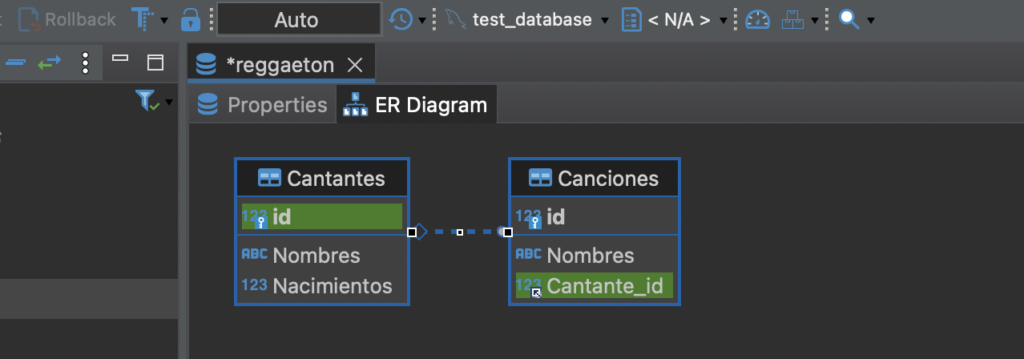
どの部分がFOREIGN KEY によって接続されているかがわかります。

